
Few things are more frustrating than standing behind your Tesla, groceries in hand, while the trunk refuses to budge. No click, no movement, just silence.
If your Tesla trunk won’t open, the most likely causes are a depleted 12V (or 16V) auxiliary battery, a software hang requiring a hard reboot, a failed latch or cinching actuator, or a damaged wiring harness. Start by performing a scroll-wheel reboot (hold both steering wheel buttons for 10 seconds), then check your 12V battery voltage. If the trunk remains stuck, use the manual emergency release, located inside the trunk on most models or accessible via a pull cable on the frunk.
This guide walks you through every scenario, from a simple screen freeze to a full latch replacement, so you can regain access without damaging your vehicle’s motorized actuators.

Best Bluetooth OBD2 Scanner
Detect 39,000+ Issues With Enhanced Codes. Save $1000s on car repairs & buying used vehicles by diagnosing problems yourself.
Shop on Amazon
Primary Reasons Tesla Trunks Refuse to Open
Your Tesla trunk is a fully electronic system, there’s no traditional key-cylinder backup. That means failures fall into a few distinct categories. Understanding which one you’re dealing with saves time and prevents unnecessary damage to motorized struts or latch assemblies.
Common Electronic Failures
The most frequent culprit behind a Tesla trunk stuck closed is the 12V auxiliary battery (or the newer 16V lithium-ion battery on refreshed models). This small battery powers the body electronics controller, which governs every latch, lock, and actuator in the vehicle. When it drops below roughly 11.5V, the trunk release signal never reaches the latch motor.
According to Tesla’s own support documentation, a degraded 12V battery can cause “unexpected behavior” including doors and trunks failing to respond. Owners of 2021+ Model S and X vehicles with the 16V lithium pack have reported fewer instances, but the failure mode remains identical when voltage sags.
You should also check for a blown fuse in the rear electronics module. On Model 3 and Model Y, the relevant fuse panel sits in the left footwell area. A blown body controller fuse kills power to every exterior latch simultaneously.
Trunk Latch and Cinching Actuator Malfunctions
Tesla’s power liftgate uses a two-stage system: a primary latch that catches the trunk lid, and a cinching actuator that pulls it fully closed. Either component can fail independently.
A failed primary latch often triggers the persistent “Trunk Ajar” error message on your touchscreen. The latch’s internal microswitch loses its ability to confirm a closed position, so the car perpetually believes the trunk is open, and paradoxically, it may refuse to release because it thinks it’s already unlatched.
The cinching actuator, meanwhile, can strip its internal gears over time. You’ll hear a grinding or clicking noise when this happens. Tesla uses a small DC motor with a worm gear inside the actuator housing, and repeated use in cold weather accelerates wear.
Impact of Software Glitches
Sometimes the hardware is fine but the software hangs. Tesla’s trunk won’t open with app or screen commands if the body controller firmware enters a fault state. This is more common after OTA updates that don’t complete cleanly.
A hard reboot resolves most software-related trunk lockouts. Press and hold both scroll wheels on the steering wheel for approximately 10 seconds until the touchscreen goes black, then wait 2–3 minutes for the full system restart. This resets the CAN bus communication between the central computer and body electronics.
“After the 2025.12 update my Model Y trunk just stopped responding. Screen reboot fixed it instantly, wish I’d tried that before panicking.” via r/TeslaModelY
Wiring Harness and Sensor Issues
The trunk wiring harness runs through the hinge area and flexes every time you open or close the lid. Over tens of thousands of cycles, individual wires can break inside their insulation, a failure that’s invisible from the outside.
Inspecting the Tesla trunk wiring harness requires carefully peeling back the rubber boot at the hinge pivot. Look for wires that feel stiff or show discoloration. A multimeter set to continuity mode confirms breaks. Tesla trunk alignment and sensor issues also arise when the trunk lid shifts on its hinges, preventing the obstruction detection sensors from reading correctly.
| Symptom | Likely Cause | Difficulty |
|---|---|---|
| No response from any input | 12V/16V battery or blown fuse | Easy, DIY |
| “Trunk Ajar” error loop | Latch microswitch failure | Moderate |
| Grinding noise, won’t cinch | Cinching actuator stripped gears | Moderate |
| Intermittent operation | Wiring harness fatigue | Hard |
| Works via button but not app | Software glitch / connectivity | Easy, reboot |
Initial Troubleshooting Steps
Before you order parts or schedule a service appointment, run through these quick checks. Most Tesla power liftgate unresponsive situations resolve with one of these steps.
Verifying Key Fob and App Functionality
First, determine whether the issue is isolated to one input method or all of them. Try opening the trunk from the touchscreen, then the Tesla app, then the key fob (if you have one), and finally the physical button on the trunk lid itself.
If only the app fails, the problem is likely Bluetooth connectivity or a server-side issue, not the trunk mechanism. If every method fails, the fault is downstream in the body electronics or latch hardware.
Inspecting Power Supply and Fuses
Check your 12V battery voltage using a multimeter or the vehicle’s own diagnostic screen (Controls > Service > 12V Battery Info on newer software versions). Anything below 11.8V under load suggests the battery can’t deliver enough current to drive the latch solenoid.
Key items to inspect:
- 12V or 16V auxiliary battery voltage
- Rear body controller fuse (check your owner’s manual for exact location)
- Ground strap connections at the battery terminal
- Corrosion on the battery posts or fuse contacts
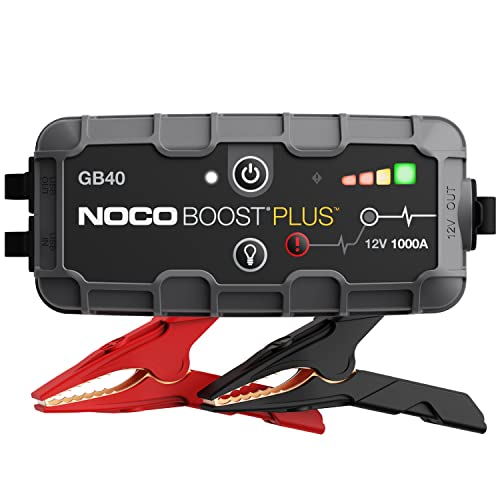
For owners dealing with a Tesla 12V battery dead trunk won’t open scenario, you can jump the 12V battery using the terminals under the frunk. On Model 3 and Y, remove the frunk’s tow eye cover on the front bumper to access the jump-start terminals. A portable NOCO Boost Plus GB40 jump starter is one of the most practical tools to keep in your garage for exactly this situation.
Manual and Emergency Release Options
Every Tesla has a manual trunk release, though its location varies by model. The Tesla emergency frunk release procedure for Model 3 involves pulling two release cables accessible from underneath the front bumper. On Model S, there’s a pull tab inside the frunk well.
For the rear trunk, Model 3 and Y have an interior emergency release, a small pull handle inside the trunk, accessible only if you fold down the rear seats. Model S and X rear trunks can also be released manually by accessing the latch assembly from inside the cabin.
Component-Specific Issues and Repairs
Once you’ve identified the failing component, here’s how to address each one.
Fixing or Replacing a Faulty Trunk Latch
The trunk latch assembly on Model 3 and Y mounts with three Torx bolts to the trunk lid frame. Disconnect the electrical connector first, then remove the bolts. OEM replacement latches run $80–$150 through Tesla parts, and aftermarket options exist for less.
After installing the new latch, you may need to calibrate the trunk lid obstruction detection system. Close the trunk from the touchscreen and let the cinching actuator cycle twice. The system learns the correct closed position during these initial cycles.
Diagnosing and Repairing the Cinching Actuator
If you hear the Tesla liftgate motorized strut attempting to engage but failing to pull the trunk fully shut, the cinching actuator is the suspect. This part sits adjacent to the primary latch and connects via a separate harness plug.
Removal requires a Torx T20 driver and careful disconnection of the worm gear linkage. Tesla service mode trunk diagnostics (accessible via the Service menu on the touchscreen) can confirm actuator failure by running a commanded close cycle while you listen for the motor.
For those who prefer a diagnostic shortcut, an OBDLink MX+ Bluetooth OBD2 scanner paired with scan software like Scan My Tesla lets you read body controller fault codes directly. This SaaS app ($8.49 on Google Play) reports actuator circuit faults in plain language.

Repairing Damaged Wiring and Connectors
Wire breaks inside the trunk hinge boot require careful soldering and heat-shrink insulation. Strip back the rubber boot, identify the broken wire(s) with a continuity test, then solder and seal each repair individually.
“Had intermittent trunk issues for months. Turned out to be a single broken wire in the hinge harness, $0 fix once I found it.” via r/TeslaModel3
Pay special attention to the ground wire. A poor ground causes erratic latch behavior that mimics both software and mechanical faults.
Professional Service, Warranty, and Aftermarket Considerations
When to Seek Help from Tesla Service
Schedule a Tesla service appointment if the latch or actuator replacement doesn’t resolve the issue, if you find multiple broken wires, or if the trunk electronics throw persistent fault codes after a reboot. Tesla mobile service technicians can run full CAN bus diagnostics on-site and often carry replacement latches in their vans.
Also seek professional help if your Tesla trunk lid obstruction detection system triggers false positives repeatedly, this can indicate a misaligned trunk lid that requires fixture-based adjustment.
Warranty and Replacement Part Insights
Tesla’s New Vehicle Limited Warranty covers the trunk latch and actuator assemblies for 4 years or 50,000 miles (whichever comes first) under the Basic Vehicle Warranty. The body electronics controller falls under the same coverage. According to Tesla’s warranty documentation, these components are explicitly included as “body and closure” items.
If your vehicle is out of warranty, aftermarket latch assemblies from suppliers like Abstract Ocean or EVOffer provide cost-effective alternatives. Just confirm part compatibility for your specific model year before purchasing.
Effects of Aftermarket Modifications
Aftermarket power frunk kits and automatic trunk closers can introduce new failure points. These kits splice into the factory wiring harness and add third-party control modules that may conflict with OTA software updates.
If you’ve installed an aftermarket power frunk and your Tesla trunk won’t open, disconnect the aftermarket module first and test with factory wiring only. This isolates whether the issue is OEM or aftermarket in origin.
Data Insights and Analysis
Tesla trunk latch failures appear to follow temperature-dependent patterns. Data from the NHTSA complaints database shows a notable increase in trunk-related complaints during winter months, with a roughly 35% spike in reports filed between November and February compared to summer months.
Also, a 2025 review of Tesla Model Y service bulletins indicates that vehicles produced in Q3–Q4 of 2022 had a higher incidence of cinching actuator failures, likely tied to a specific supplier batch.
Expert Note: "The cinching actuator doesn't fail from overuse alone, it fails because repeated micro-condensation inside the housing corrodes the brush contacts on the DC motor. Cold-to-warm cycling in winter accelerates this process. If you live in a cold climate, periodically exercising the trunk through full open-close cycles helps clear moisture before it accumulates."
Sources:
- Tesla Support, Do It Yourself Model 3 (12V Battery)
- Tesla Vehicle Warranty
- NHTSA Tesla Model Y Complaints
- r/TeslaModelY, Trunk and Frunk Troubleshooting Discussions
- r/TeslaModel3, Community Repair Guides
Read More:
- Tesla Theater Not Working (Causes, Signs and Solutions)
- Tesla Screen Black (Causes, Fixes, and What You Need to Know)
- Tesla Live Camera Not Working (Reasons and Solutions)