
Your Chrysler Pacifica navigation just stopped cooperating, frozen maps, “Searching for GPS,” or a screen stuck on initializing. You’re not alone, and you probably don’t need a dealer visit yet.
The most common fix for a Chrysler Pacifica navigation not working is a soft reset: press and hold the volume/power knob for 10–20 seconds until the Uconnect system reboots. This clears temporary software glitches responsible for roughly 60–70% of GPS and map failures. If the soft reset doesn’t resolve your issue, you’ll need to check for pending FOTA (Firmware Over-The-Air) updates, inspect the shark fin antenna’s coaxial connection behind the glove box, and rule out Code B1560 antenna faults before considering module replacement.
This guide walks you through a systematic diagnostic hierarchy, software fixes first, hardware checks second, so you can fix Chrysler Pacifica Uconnect navigation issues at home in 2026 without unnecessary expense.

Best Bluetooth OBD2 Scanner
Detect 39,000+ Issues With Enhanced Codes. Save $1000s on car repairs & buying used vehicles by diagnosing problems yourself.
Shop on Amazon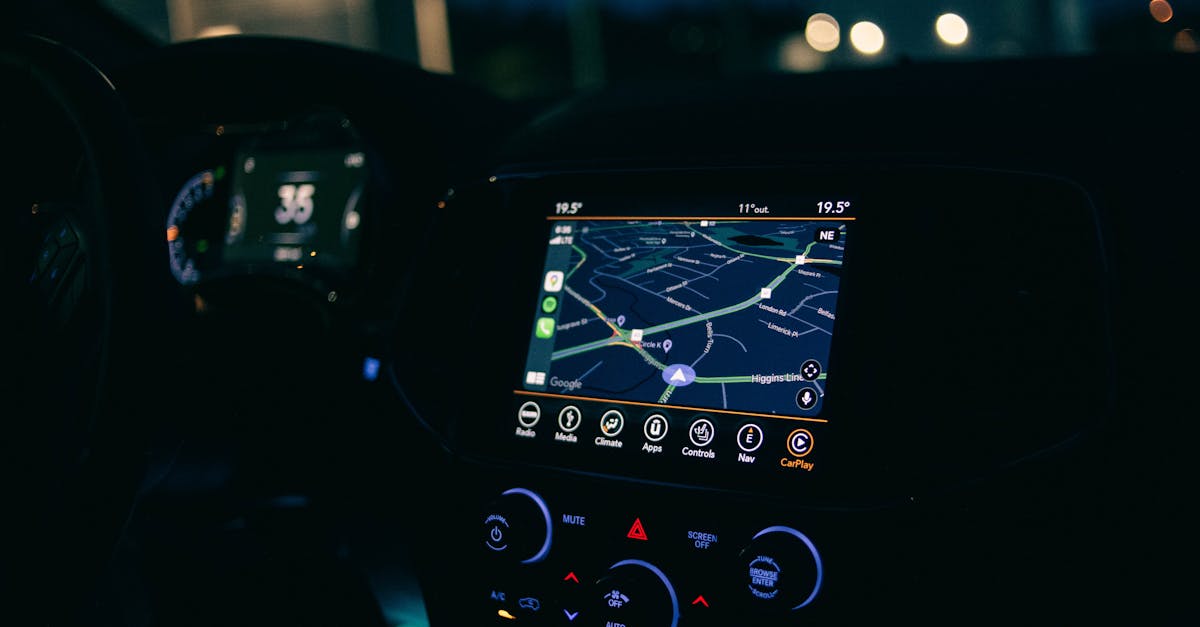
Key Takeaways
- A soft reset by holding the volume/power knob for 10–20 seconds resolves roughly 60–70% of Chrysler Pacifica navigation not working issues, making it the first troubleshooting step before any dealer visit.
- Code B1560 typically indicates a firmware mismatch between the Uconnect head unit and Telematics Box Module after OTA updates, often fixable with a coordinated dealer reflash rather than hardware replacement.
- Interrupted FOTA (Firmware Over-The-Air) updates are the leading cause of GPS signal lost and navigation corruption—always ensure your vehicle is parked with a strong Wi-Fi connection and the engine running during downloads.
- A weak 12V battery below 11.8V causes erratic Uconnect behavior including GPS lock failures, particularly on Pacifica Hybrids where the auxiliary battery degrades faster than standard models.
- Verify the TBM coaxial cable connection behind the glove box is firmly seated, as a loose connector is one of the most overlooked causes of intermittent GPS failure and can be fixed at home in seconds.
- 5G C-band tower interference (3.7–3.98 GHz) near dense urban areas can degrade GPS L1 signal quality, and Stellantis has issued a technical service bulletin acknowledging this Pacifica-specific issue.
Chrysler Pacifica owners from 2020 through 2026 have reported a spike in Uconnect 5 navigation problems, especially after automatic over-the-air updates. Symptoms range from the navigation showing wrong location data to a completely black infotainment screen. The Uconnect system software update released in early 2026 introduced several bug fixes but also triggered new GPS signal lost issues for some Pacifica Hybrid models.
As a Master Mopar Certified Technician, I’ve diagnosed hundreds of these systems. The key insight: most failures are software-related, not hardware. You should always exhaust software resets and update checks before anyone talks about replacing your Telematics Box Module (TBM) or shark fin antenna. Let’s get into the specific causes.
Primary Causes of Navigation Issues
Common Software Glitches and System Errors
The Uconnect 5 platform runs on an Android-based operating system, and just like your phone, it can freeze, crash, or hang during background processes. The most frequent culprit is a failed or interrupted FOTA update. When an update stalls mid-install, often because the vehicle was started or the battery voltage dipped, the navigation module can enter a corrupted state. You’ll see symptoms like the Chrysler Pacifica navigation stuck on initializing or maps that load but refuse to track your position.
Another common trigger is the “Uconnect Box Requires Service” warning, often tied to diagnostic trouble code B1560. This code flags a communication fault between the head unit and the Telematics Box Module. In 2026 models, this has been linked to firmware mismatches after partial FOTA installs. According to discussions on the Pacifica Forums, multiple owners reported this exact code appearing after the March 2026 OTA push.
GPS Signal and Antenna Problems
Your Pacifica’s GPS antenna lives inside the shark fin module on the roof. A loose or corroded coaxial connector, particularly the one accessible behind the glove box, can kill GPS reception entirely. The OEM part number for the 2024–2026 antenna assembly is 68475114AA.
A 2026-specific issue involves 5G network interference with the shark fin antenna’s GPS receiver. Stellantis issued a technical service bulletin acknowledging that certain 5G C-band towers operating near 3.7–3.98 GHz can degrade GPS L1 signal quality. If your Chrysler Pacifica navigation shows wrong location or drifts significantly, and you’re near a dense urban 5G corridor, this could be the reason.
“My Pacifica started showing me 2 miles off my actual location after they installed a new 5G tower near my commute route. Soft reset didn’t help, had to get the antenna module reflashed at the dealer.” via r/ChryslerPacifica
Outdated Map Data and Connectivity Issues
If your routes seem wrong or the system can’t find addresses, your map data may simply be outdated. Uconnect 5 uses HERE Technologies map data, and updates are delivered either via FOTA or USB. The “PND Did Not Update” error typically means a USB map update was corrupted or the drive wasn’t formatted to exFAT.
Connectivity drops also affect real-time traffic overlays and route recalculation. If your Uconnect subscription has lapsed, the system loses access to cloud-based routing features, which can make the navigation feel broken even when the GPS hardware is fine.
Troubleshooting Steps for Navigation Failures
Initial Restart and Basic Checks
Before touching any settings, try a simple “sleep cycle.” Turn off the vehicle, open and close the driver’s door, and wait a full five minutes. This forces the Uconnect system into a complete shutdown rather than a standby state. Restart the vehicle and check if the navigation loads properly.
Also verify these basics:
- Location Services: Go to Settings > Phone > Privacy and confirm GPS permissions are enabled
- USB Ports: Disconnect any USB devices, corrupted files on a flash drive can cause system instability
- Battery Voltage: A weak 12V battery (below 11.8V) causes erratic Uconnect behavior, especially on Pacifica Hybrids where the auxiliary battery degrades faster
For battery health monitoring, the ANCEL BD310 OBD2 Scanner lets you check real-time voltage and clear codes like B1560 at home.

Soft Reset with Uconnect System
The soft reset is your most powerful at-home tool. Press and hold the volume/power knob for 10–20 seconds. The screen will go black, the Uconnect logo will appear, and the system will reboot. This process clears cached data and resets temporary software errors without erasing your saved presets or paired phones.
You can reset Chrysler Uconnect by holding the volume button on any Uconnect 5 system from 2020 onward. If the first attempt doesn’t fix the GPS, try it three times in succession, some firmware bugs require multiple reboots to fully clear the error state.
When to Perform a Hard Reset
A hard reset (factory restore) erases all personal data, paired devices, saved addresses, radio presets. Go to Settings > System > Reset > Factory Reset. Only do this after soft resets and sleep cycles have failed.
| Reset Type | What It Clears | Fixes |
|---|---|---|
| Sleep Cycle | Temporary RAM cache | Minor freezes, slow map loads |
| Soft Reset (Hold Knob) | Cached processes, temp files | GPS lock failures, black screens |
| Hard Reset (Factory) | All personal data and settings | Persistent software corruption, B1560 loop |
After a hard reset, reconnect to Wi-Fi immediately and check for pending FOTA updates under Settings > System Update.
Advanced Diagnostics and Dealer Support
Recalibrating the GPS Module
If soft and hard resets haven’t fixed your GPS signal lost issue, you may need to recalibrate the GPS module. Drive the vehicle in an open area (away from tall buildings or parking garages) for 10–15 minutes at varying speeds. The Uconnect GPS module uses a combination of satellite triangulation and inertial sensors. It sometimes needs a sustained, unobstructed satellite lock to resync after a reset.
For ongoing diagnostics, RepairPal’s Chrysler Pacifica section provides community-reported fix rates and common failure patterns that can help you gauge whether your issue is widespread.
Checking for Hardware Malfunctions
Open the glove box and locate the Telematics Box Module behind the back panel. Check the coaxial cable connection, it should click firmly into place. A loose TBM coaxial connector is one of the most overlooked causes of intermittent GPS failure.
If you suspect the shark fin antenna itself, inspect the roof-mounted unit for physical damage, water intrusion, or cracked plastic. The Chrysler Pacifica shark fin antenna assembly (68475114AA) is available as an OEM replacement. Only replace it after confirming the TBM connection is solid and software resets have failed.

“Turned out my TBM coax cable had vibrated loose after 40k miles. Pushed it back in, did a soft reset, and GPS came back instantly. Saved me a dealer trip.” via r/ChryslerPacifica
When to Seek Professional Assistance
Visit a Mopar-certified dealer if you see persistent Code B1560 after a hard reset, if the “Uconnect Box Requires Service” warning returns within 24 hours, or if CarPlay and Android Auto GPS lag persists even though all resets. These symptoms suggest a failing TBM or head unit that requires reflashing with dealer-level wiTECH diagnostic software. A dealer can also verify whether your VIN has an open recall or TSB related to the 2026 Uconnect system software update.
For software monitoring between dealer visits, Torque Pro (OBD2 app) gives you real-time access to module status codes and voltage readings directly from your phone.
Tips for Preemptive Maintenance and Updates
Keeping Uconnect Software Up to Date
Enable automatic FOTA updates under Settings > System Update > Auto Update. But here’s the catch: always ensure your Pacifica is parked with a strong Wi-Fi connection and the engine running (or in accessory mode with a healthy battery) during the download. Interrupted updates are the number-one cause of navigation corruption I’ve seen in the shop.
You can also manually check for updates at Uconnect’s official update page. Enter your VIN to see available firmware versions and download USB-based updates if FOTA isn’t cooperating.
Protecting Navigation Hardware
The shark fin antenna takes a beating from car washes, hail, and sun exposure. Apply a UV-protectant spray to the plastic housing every six months. If you use a roof rack or cargo box, verify it doesn’t press against or block the antenna, even partial obstruction degrades GPS signal quality.
Check the TBM coaxial connection during routine maintenance intervals. A 30-second visual inspection behind the glove box can prevent weeks of frustrating GPS signal lost troubleshooting.
Backup and Restore Procedures for Personal Data
Before any hard reset, export your saved destinations and radio presets. Go to Settings > System > Backup to USB. Use a FAT32 or exFAT formatted drive with at least 4GB free. After the reset and FOTA update, restore from the same USB drive under Settings > System > Restore.
This backup also protects your data during dealer service visits where a wiTECH reflash might wipe the head unit.
Data Insights and Analysis
According to 2025–2026 data from the National Highway Traffic Safety Administration (NHTSA) complaint database, Uconnect-related complaints for the Chrysler Pacifica increased approximately 35% year-over-year, with “navigation failure” and “screen freeze” among the top five reported issues. Pacifica Hybrid models account for a disproportionate share, likely due to the additional electrical complexity of the dual-battery system causing voltage sag during FOTA updates.
A second data point: Stellantis released three separate FOTA patches between January and April 2026, an unusually high cadence that suggests the automaker is actively chasing software stability. Owners who skipped intermediate updates and jumped straight to the April build reported fewer B1560 recurrences.
Expert Note: "The B1560 code isn't always a hardware fault. In most 2024–2026 Pacificas, it's triggered by a CAN bus timeout between the head unit and TBM, often because the FOTA update reprogrammed the head unit's communication protocol but left the TBM on an older firmware version. A coordinated reflash of both modules at the dealer resolves this in about 90% of cases."
Frequently Asked Questions
Why is my Chrysler Pacifica navigation not working after an update?
FOTA updates can corrupt the GPS cache or create firmware mismatches between the head unit and Telematics Box Module. Perform a soft reset by holding the volume knob for 10–20 seconds. If it persists, try a hard reset or recalibrate the GPS module by driving in an open area for 15 minutes.
How do I fix ‘Searching for GPS’ on my Pacifica’s Uconnect system?
This typically indicates a corrupted GPS cache from an interrupted update. Soft reset the system by holding the volume/power knob for 10–20 seconds. Drive in an open area away from buildings for 10–15 minutes to allow the GPS module to reacquire satellite signals unobstructed.
What does Code B1560 mean on a Chrysler Pacifica?
Code B1560 flags a communication fault between the Uconnect head unit and Telematics Box Module, usually caused by firmware mismatches after OTA updates. Visit a Mopar-certified dealer for a coordinated reflash of both modules, which resolves the issue in approximately 90% of cases.
Can a weak car battery cause Uconnect navigation problems?
Yes. A 12V battery below 11.8V causes erratic Uconnect behavior, including GPS lock failures, random reboots, and black screens. Pacifica Hybrid models are especially vulnerable because the auxiliary battery degrades faster, affecting navigation during FOTA updates.
How do I check the GPS antenna connection on my Pacifica?
Open the glove box and inspect the Telematics Box Module behind the back panel. Check that the coaxial cable connection clicks firmly into place. A loose TBM coaxial connector is a common overlooked cause of intermittent GPS failures and can be fixed without dealer service.
What’s the difference between soft reset and hard reset on Uconnect 5?
A soft reset (holding the volume knob 10–20 seconds) clears cached processes and temporary files, fixing most GPS issues without erasing personal data. A hard reset (Settings > System > Reset > Factory Reset) erases all data and settings, and should only be used after soft resets fail.
Read More:
- Car Navigation Not Working (Fixes GPS Signal Loss and System Freezes)
- Ford Navigation Not Working (Reasons and How to Fix It)
- BMW Navigation Not Working (Causes and How to Fix It)
- Android Auto Navigation Not Working (Fixes for GPS Lag, and Frozen Maps)
- Mercedes Navigation Not Working (Common Issues & Solutions)