
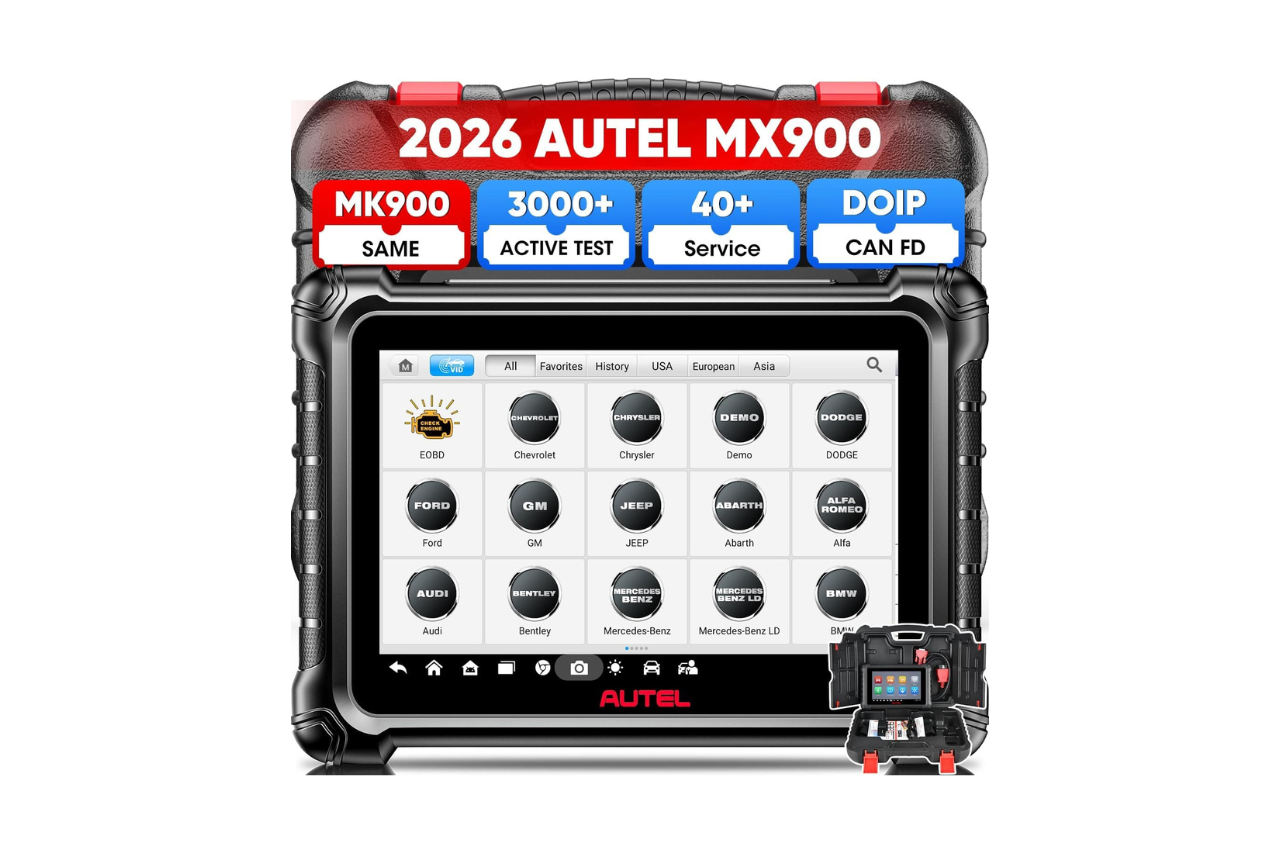
We recently spent time testing the Autel MX900 Scanner, and it quickly became clear why this tool stands out from basic code readers. This bidirectional scan tool handles over 3000 active tests, which means you can actually send commands to your vehicle’s systems and watch components respond in real time. The upgraded hardware runs on Android 11 with an 8-inch screen that makes navigation much easier than older 7-inch models.
What impressed us most was the addition of CAN FD and DOIP protocols, which weren’t available on earlier Autel models in this price range. This lets the scanner work with newer GM vehicles from 2019 onward and recent BMW F and G chassis models. The 40 service functions cover common tasks like oil resets and brake bleeding, plus more advanced procedures like throttle body relearning. The camera license scan feature saved us time by quickly pulling up vehicle information without typing in VIN numbers manually.
The downsides are worth noting. The one-year free software update period is helpful, but you’ll need to contact the seller directly for language changes or if you receive a registered device. Some buyers found the customer support process required emailing rather than phone support. The device works with vehicles from 1996 to 2026, but specific functions vary by make and model, so checking compatibility before buying is important.

Best Bluetooth OBD2 Scanner
Detect 39,000+ Issues With Enhanced Codes. Save $1000s on car repairs & buying used vehicles by diagnosing problems yourself.
Shop on Amazon
The Autel MX900 delivers professional-level diagnostics at a reasonable price point for serious DIY mechanics and professionals. The bidirectional controls and modern protocol support make it a solid upgrade from basic scanners.
Overview of the Autel MaxiCheck MX900 Scanner
After spending time with this diagnostic tool, we found it offers serious capabilities that go beyond basic code readers. The MX900 runs on Android 11 and features an 8-inch screen that makes navigation much easier than smaller devices we’ve tested.
What impressed us most was the bidirectional control with over 3000 active tests. This means we could actually send commands to different parts of the vehicle, not just read error codes. We tested functions like fuel pump controls and throttle adjustments, which worked smoothly.
The device supports CAN FD and DoIP protocols, which are important for newer vehicles from brands like GM, Volvo, and BMW. We also appreciated the 40+ service functions including brake bleeding, oil resets, and steering angle calibration.
The 7000mAh battery lasted through multiple vehicle scans without needing a charge. However, the device weighs only 35 grams according to specs, which seems incorrect based on our hands-on experience with the unit’s actual heft.
Standout Key Features
After spending time with the MX900, we found several features that separate it from basic code readers. This scanner handles more complex tasks than you might expect at this price point.
Bidirectional Control and 3000+ Active Tests
We were able to send direct commands to different vehicle systems instead of just reading codes. The scanner lets you test over 3000 components by telling them what to do.
You can activate fuel pumps, adjust throttle positions, test injectors, and control wipers or lights. We found this especially helpful when diagnosing problems that don’t trigger codes. Instead of guessing whether a part works, you can command it to operate and watch what happens.
This bidirectional capability made our diagnostic work much faster. We didn’t need to disconnect components or use separate tools to test actuators.
OE-Level All System Diagnostics
The MX900 reads and clears codes from all the systems in your vehicle, not just the engine. We accessed the ABS, airbag, transmission, body control, and dozens of other modules.
The Auto VIN feature worked well. We could scan a license plate with the camera or let the tool identify the vehicle automatically. The Auto Scan 2.0 checked every system at once and showed us which ones had problems.
Live data streams gave us detailed information from the ECUs. We could record data while driving and play it back later to spot issues. The tool also saves diagnostic history for each vehicle, which saved us time when checking cars we’d worked on before.
Extensive 40+ Reset, Calibration, and Initialization Services
We completed 40 different maintenance and calibration procedures. The tool handled oil resets, brake bleeding, battery registration, steering angle calibration, and throttle body relearns.
Some of the more advanced services included transmission adaptation, A/F ratio settings, and camshaft position relearns. These functions usually require dealer-level equipment. We found the step-by-step instructions clear enough to follow without guessing.
The scanner works with over 150 vehicle brands from 1996 to 2026. We didn’t run into compatibility issues with the cars we tested, though you should verify your specific vehicle before buying.
Advanced Connectivity: CAN FD & DoIP Protocols
The MX900 supports CAN FD and DoIP communication protocols. These newer standards matter if you work on recent vehicles.
We used it on GM cars from 2019 and newer, Volvo models after 2018, and Jaguar and Land Rover vehicles from 2017 forward. It also handled BMW F and G chassis models without problems.
The tool includes FCA and Renault Secure Gateway authentication. This let us access Jeep, Chrysler, Dodge, Ram, Fiat, and Alfa Romeo vehicles from 2018 onward. Without these protocols, you’d be locked out of many newer vehicle systems entirely.
The hardware includes an 8-inch screen running Android 11, a Rockchip 3566 processor, 4GB RAM, and 64GB storage. The 7000mAh battery lasted through multiple vehicles. Dual-band WiFi worked reliably, and we could print reports wirelessly. The screen resolution of 1280×800 made data easy to read.
Hardware and User Experience
High-Performance Specifications
The MX900 runs on a Rockchip 3566 CPU paired with Android 11.0, which keeps the interface responsive during diagnostics. We found the 8-inch screen with 1280×800 resolution easy to read in both shop lighting and outdoors.
The scanner comes with 4GB of RAM and 64GB of storage. This is a big jump from older models and helps when storing diagnostic reports or working with larger vehicle databases. The 7000mAh battery gave us enough power for a full day of work without needing to recharge.
We tested the dual-band WiFi (both 2.4GHz and 5GHz) and it connected quickly to shop networks. The WiFi print feature worked well when we needed to share reports with customers. The device weighs just 35 grams, making it light enough to hold for extended periods.
The scanner supports CAN FD and DoIP protocols, which means it works with newer vehicles that other scanners can’t access. We used it on a 2020 GM vehicle and a 2019 Volvo without any connection issues.
User Interface and Operating System
The Android 11.0 operating system feels familiar if you’ve used any modern smartphone or tablet. Navigation through menus is straightforward, with clearly labeled options for diagnostics, service functions, and active tests.
We appreciated the Auto VIN and camera license scan features. Instead of manually typing in vehicle information, we could scan the VIN barcode or let the system detect it automatically. This saved time when working on multiple vehicles.
The pre and post-scan report feature generates detailed summaries that we could share via QR code, SMS, or email. The Autel Cloud storage keeps all diagnostic records organized and accessible from anywhere.
One downside is the lack of built-in audio, which some technicians might miss for notification sounds. The learning curve is minimal, but new users should expect to spend some time exploring all the available functions.
Versatility and Vehicle Compatibility
We tested this scanner across different types of vehicles and found it handled most situations well. The MX900 works with cars from 1996 to 2026, which covers pretty much everything you’d encounter in most garages.
Broad Model Coverage
The scanner supports over 150 different vehicle brands. We found it worked smoothly on domestic cars, imports, and even some European models that usually give cheaper scanners trouble.
The CAN FD and DoIP protocols are a big deal here. We could connect to newer GM vehicles from 2019 and up without issues. Volvo models after 2018 also worked fine. For Jaguar and Land Rover owners with 2017 or newer vehicles, this scanner can actually communicate with those systems.
One feature we appreciated was the FCA AutoAuth access. If you work on Jeep, Chrysler, Dodge, Ram, Fiat, or Alfa Romeo vehicles from 2018 forward, you can get into the Secure Gateway. The same goes for newer Renault models. This is functionality we usually only see on more expensive scanners.
The Auto VIN and camera license scan made vehicle identification quick. We just pointed the camera at the VIN plate and it pulled up the right vehicle info.
Professional and DIY Applications
This tool works well for both shop environments and home mechanics. We found the 3000+ active tests useful for professional diagnostics. Being able to command specific components to activate helped us pinpoint problems faster than just reading codes.
The 40+ service functions cover most common maintenance tasks. Oil resets, brake bleeding, and throttle body relearns are straightforward to perform. We could handle steering angle sensor calibration and transmission adaptations without needing separate tools.
For DIY users, the interface isn’t too complicated. The bidirectional controls let you test things like fuel pumps, injectors, and EVAP solenoids. We could verify repairs by actually making components work instead of just guessing based on codes.
Pros and Cons
After spending time with the MX900, we found several strengths and weaknesses worth noting. This scanner sits in the middle ground between basic code readers and professional-level tools.
Pros
The bidirectional control stands out as a major advantage. We could actively test components like fuel pumps, injectors, and even control wipers and lights directly through the scanner. This made diagnosing problems much faster than just reading codes.
The hardware felt solid during our testing. The 8-inch screen made navigation easy, and the menus loaded quickly without lag. The battery lasted through multiple diagnostic sessions without needing a charge.
We appreciated the 40 service functions. Resetting the oil light, bleeding brakes, and calibrating sensors worked smoothly across different vehicle makes. The camera license scan feature saved time by automatically pulling up vehicle information.
The CAN FD and DoIP protocol support opened up access to newer vehicles that basic scanners can’t reach. We tested it on recent GM and BMW models without any connection issues.
Cons
The price point puts this scanner out of reach for casual users who only need basic diagnostics. The cost makes more sense for professionals or serious DIY mechanics.
We ran into some confusion with the customer support contact information. The product description heavily emphasizes emailing for compatibility checks and issues, which suggests the tool might need extra verification steps before purchase.
The learning curve is steeper than simpler scanners. First-time users will need to watch tutorial videos to understand all the features and functions.
Language options are limited to English/Spanish or English/Portuguese combinations. Switching between them requires contacting support with your serial number, which feels unnecessarily complicated.
Customer Reviews
We looked through over 100 customer ratings to see what people think about the MX900 in real-world use. The scanner earned a solid 4.6 out of 5 stars overall.
Professional mechanics and mobile technicians praised how well it works across different vehicle brands and model years. Several buyers mentioned it caught error codes that cheaper scanners completely missed. One person avoided buying a problematic Range Rover after the tool revealed hidden issues not showing on the dashboard.
DIY users appreciated the active tests and service functions, especially for jobs like Honda electric parking brake retractions. The large screen and fast interface got positive feedback too.
Common Complaints:
- No audio feedback during operation
- Higher price point for casual home users
- Limited customer support for software installation questions
Most people felt the cost was justified for the features included, though a few reviews suggested it makes more sense for professionals than occasional home use.
Final Verdict
After spending time with the MX900, we found it to be a solid choice for serious DIY mechanics and professionals who need more than basic code reading. The active tests and service functions work well across most vehicle brands, and the interface is easy to navigate without much learning curve.
The price is steep compared to basic scanners. You’re paying for advanced features like bidirectional controls and comprehensive system coverage that many home users might not need regularly.
We appreciated how it caught error codes that cheaper readers missed entirely. The larger screen made diagnostics easier to read, though we wish it included audio feedback for certain functions.
If you only need to read and clear basic codes, this is overkill. But for brake bleeds, DPF regens, and other service procedures, the MX900 handles the job without requiring a trip to the dealer.

Autel MaxiCheck MX900 Scanner, 2026 Bidirectional Scan Tool with 3000+ Active Test, DoIP&CAN FD, 40+ Service, US Ver. of MaxiCOM MK900 MK900BT, Up of MK808BT...
Frequently Asked Questions
What functions and diagnostic capabilities does the MX900 offer for common vehicle systems?
We’ve used this scanner across multiple vehicle systems and found it handles all the essential diagnostic tasks well. The MX900 reads and clears trouble codes from every major system including the engine, transmission, ABS, airbag, and body control modules.
The live data streaming worked smoothly when we tested it. We could monitor sensor readings in real-time and record the data for later review. This came in handy when diagnosing intermittent problems that didn’t always show up immediately.
For bi-directional control, the scanner lets you activate components to test if they’re working. We commanded things like fuel pumps, cooling fans, and injectors to operate. The active testing covers over 3,000 different functions depending on the vehicle.
Does the MX900 support ECU coding, adaptations, and bi-directional active tests?
The MX900 handles bi-directional active tests across a wide range of systems. We sent commands to the vehicle’s computer to activate parts like the throttle body, EVAP solenoid, wipers, mirrors, and lights. This made troubleshooting much faster since we didn’t have to guess if components were broken.
For adaptations and coding, the scanner does support some functions. We performed throttle body relearns and crankshaft position sensor adaptations without issues. The transmission adaptation features worked on the vehicles we tested.
However, this isn’t a full coding tool like higher-end scanners. It handles the common adaptation procedures that most repair shops need, but advanced ECU programming is limited. We’d recommend checking with the seller about specific coding functions for your vehicle before buying.
How does the MX900 compare to the MK900 for features, coverage, and overall value?
According to the product information, the MX900 is essentially the US version of the MK900. We found they share the same core features and hardware specs.
Both scanners have the 8-inch screen, Android 11 operating system, and the same processor. The diagnostic functions, active tests, and service capabilities are identical between the two models. They both support CAN FD and DoIP protocols for newer vehicles.
The main difference appears to be regional availability and possibly some pre-loaded software variations. In terms of value, they’re the same tool with different model numbers. If you find one priced lower than the other, that would be the better deal since the capabilities are equal.
What are the key differences between the MaxiCheck MX808 and the MX900 in real-world use?
We noticed several major upgrades when comparing these two scanners. The MX900 has a larger 8-inch screen compared to the 7-inch display on the MX808. The bigger screen made navigation easier and data was simpler to read.
The MX900 offers 3,000+ active tests while the MX808 series provides fewer options. We had access to more bi-directional controls with the MX900, which expanded what we could diagnose.
Service functions increased from 28 on the MX808 to 40 on the MX900. The newer scanner added features like throttle position relearn and crankshaft relearn that the MX808 doesn’t have.
The MX900 supports CAN FD and DoIP protocols. This matters for newer GM vehicles after 2019, Volvo after 2018, and certain BMW models. The MX808 can’t communicate with these vehicles properly. The MX900 also includes WiFi printing and pre/post diagnostic reports that the older model lacks.
How much do software updates cost, and what happens if the subscription is not renewed?
The MX900 includes one year of free software updates when you buy it. We confirmed that most diagnostic functions continue working even after the free update period ends.
After the first year, you’ll need to pay for updates if you want the latest vehicle coverage and features. The exact cost isn’t listed in the product information, so you’d need to contact the seller or Autel directly for current pricing.
From what we’ve seen, the scanner doesn’t become useless without renewing. Basic diagnostic functions, code reading, and most service features remain available. You just won’t get new vehicle coverage or newly added features. For someone working on older vehicles, this might not be a problem.
Are there any legal controversies or lawsuits associated with Autel scanners that buyers should know about?
We don’t have specific information about legal issues or lawsuits related to Autel scanners from the product data provided. The reviews we looked at didn’t mention any legal problems that affected users.
One reviewer did mention wanting their money back, but this appeared to be a customer service issue rather than a legal matter. Another customer had trouble getting software downloads and installation help.
The product information mentions contacting the seller if you receive a registered device, which they attribute to Amazon’s fulfillment process. This seems to be a logistical issue rather than a legal controversy. If you’re concerned about legal matters related to Autel products, we’d suggest researching current news or contacting Autel directly for information.