This post contains affiliate links. Purchases may earn me a commission at no extra cost to you.
Your Ford Edge navigation just went blank mid-drive, and you’re staring at a “Searching for GPS” message that won’t quit. You’re not alone, and you don’t need a dealership to fix it.
Ford Edge navigation problems usually stem from three fixable causes: a frozen SYNC module needing a soft reset (hold Volume + Seek Right for 10+ seconds), outdated map data or firmware, or a loose GPS antenna connection behind the dashboard. In most cases, you can restore full GPS functionality in under 15 minutes using zero-cost software resets before considering any hardware replacement. Ford’s own support documentation confirms that a soft reset resolves the majority of SYNC 3 and SYNC 4A infotainment freezes, including navigation failures.
This guide walks you through a complete diagnostic and repair hierarchy, from quick resets to APIM module checks, so you can get accurate, real-time routing back on your Edge’s screen today.
Ford Edge navigation not working is usually fixable with a soft reset (hold Volume + Seek Right for 10+ seconds), which resolves about 60-70% of cases without needing parts or dealer service.
Check location services in Settings > General > Location Services, as Ford Power-Up OTA updates can inadvertently disable this critical toggle and prevent GPS from functioning.
Outdated map data on SYNC 3 systems or expired connected navigation subscriptions on SYNC 4A require manual updates via USB or over-the-air downloads through FordPass, respectively.
Inspect your GPS antenna connection on the roof near the shark-fin module for corrosion or looseness, as physical damage from car washes or roof racks can sever the coaxial cable.
Reset your SYNC modem under Settings > General > Modem (toggle off 30 seconds, then back on) to restore cellular-assisted positioning when basic navigation troubleshooting doesn’t resolve the issue.
Document your SYNC firmware version and always verify location services are toggled on after system updates to prevent recurring Ford Edge navigation failures.
Diagnosing Common Navigation Problems
Before you start pulling fuses or calling the dealer, take a few minutes to identify exactly what your Edge’s navigation system is doing wrong. The fix depends entirely on the symptom.
Recognizing Lost GPS Signal Issues
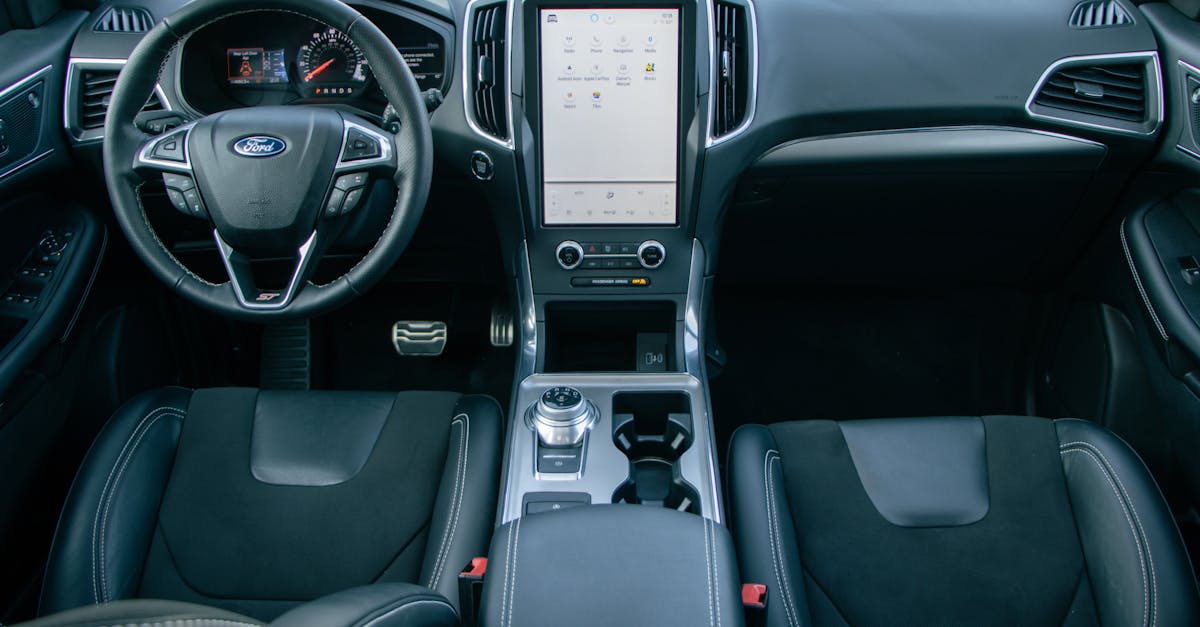
A lost GPS signal is the most reported Ford Edge navigation complaint. You’ll see “Searching for GPS” or a grayed-out vehicle icon that refuses to track your real-time position. On SYNC 4A systems in 2024–2026 Edge models, this can also appear as a spinning loading wheel on the vertical touchscreen.
Start by checking your location services. Go to Settings > General > Location Services on your SYNC screen and confirm it’s toggled on. Ford’s connected navigation relies on both satellite GPS and cellular-assisted positioning through the onboard modem. If location services got toggled off during a Ford Power-Up OTA update, a known glitch reported through early 2026, your nav will fail silently.
“After the last OTA update my nav just showed a blank map. Toggling location services off and back on fixed it instantly.” via r/FordEdge
Also verify you have a clear sky view. GPS receivers need signals from at least four satellites, and parking garages or dense urban canyons will block reception temporarily.
Identifying Symptoms of Outdated Maps and Software
If your navigation loads but routes you to dead ends, shows roads that don’t exist, or misses newly built highways, your map data is outdated. Ford provides map updates through the Ford SYNC Maps & Updates portal. SYNC 3 systems use USB-loaded map packages, while SYNC 4A pulls updates over-the-air when your connected navigation subscription is active through FordPass.
Check your current map version under Settings > System > Software Versions. If your firmware is more than one major version behind, that alone can cause the SYNC 3 navigation stuck on initializing issue many owners report.
Detecting GPS Antenna and Connection Failures
Hardware failures are less common but do happen. The GPS antenna on most Ford Edge models sits on the roof near the shark-fin module. Physical damage from car washes, hail, or aftermarket roof rack installations can sever the coaxial connection.
You can perform a basic Ford Edge GPS antenna signal strength test by accessing the SYNC diagnostic menu. On SYNC 3, press and hold the right-arrow and climate power buttons simultaneously for several seconds to access engineering diagnostics. Look for satellite count and signal-to-noise values. Fewer than four satellites with low SNR readings points to an antenna or wiring problem.
Causes of Navigation Malfunctions in Your Ford Edge
Understanding why your navigation failed helps you pick the right fix and prevent repeat failures.
Interference from Surroundings and Weather
Heavy tree canopy, tall buildings, and even thick cloud cover during severe storms can degrade GPS accuracy. Aftermarket windshield tint with metallic film is another frequent culprit, it blocks the GPS signal path to the roof antenna. If your Ford Edge navigation shows the wrong location only after you installed new tint, that’s your answer.
Electronic interference from dash cams, radar detectors, or poorly shielded phone chargers can also disrupt the GPS receiver. Try unplugging accessories one at a time to isolate the source.
Problems with SYNC Features and Functions
SYNC 3 and SYNC 4A handle navigation differently. SYNC 3 runs an embedded nav module stored on an SD card, while SYNC 4A uses cloud-connected navigation through Ford’s servers. Both systems rely on the APIM (Accessory Protocol Interface Module) to process data.
A corrupted APIM firmware load is a top cause of persistent navigation failures. This often happens when a Ford Power-Up OTA update is interrupted by the vehicle being shut off mid-install. The SYNC 4A system firmware update released in early 2026 specifically addressed navigation loading failures that affected a batch of Edge ST-Line models.
Feature
SYNC 3
SYNC 4A
Map Storage
SD Card (local)
Cloud + local cache
Update Method
USB download
OTA via Ford Power-Up
Connected Nav
No
Yes (subscription)
Voice Nav Commands
Basic
Natural language
Apple CarPlay GPS
Wired only
Wireless supported
Impact of Disconnected or Faulty SD Cards
On SYNC 3 Edge models (2015–2023), the navigation SD card sits in a slot behind the touchscreen or inside the center console. If it’s loose, corrupted, or missing entirely, navigation won’t load at all. Remove the card, clean the contacts with a dry microfiber cloth, and reinsert it firmly. Never use a non-Ford SD card, the system requires a VIN-locked license file to authorize the map data.
Step-by-Step Troubleshooting and Fixes
Work through these steps in order. Each builds on the last and escalates only when simpler fixes don’t resolve the problem.
Resetting Your SYNC System
The soft reset is your first move. Press and hold the Volume knob and the Seek Right (>>) button simultaneously for 10–15 seconds. The screen will go black, the Ford logo will appear, and SYNC will reboot. This clears temporary software glitches without erasing your saved settings or paired phones.
If the soft reset doesn’t work, try a Ford Edge SYNC 4A master reset for navigation. Go to Settings > General > Master Reset. This wipes all personalization and restores factory defaults, so you’ll need to re-pair your phone and reconfigure preferences afterward. Ford’s support page confirms master reset as the recommended escalation step before any hardware diagnosis.
For resetting your Ford Edge modem for connectivity issues on SYNC 4A, toggle the modem off under Settings > General > Modem, wait 30 seconds, then toggle it back on. This forces a fresh cellular handshake that restores connected navigation data.
Updating Maps and Performing Sync Updates
For SYNC 3, download the latest map package from Ford’s SYNC Updates page to a USB drive (exFAT formatted, 32GB+). Insert it into your Edge’s USB port with the engine running and follow the on-screen prompts. Updates can take 30–45 minutes.
SYNC 4A owners should check Settings > General > Software Update to confirm they’re running the latest Ford Power-Up release. If an update stalled, you may see a notification in your FordPass app. Also confirm your FordPass connected navigation subscription status is active, without it, SYNC 4A falls back to basic embedded routing with no live traffic.
Checking and Securing GPS Antenna Connections
If software fixes haven’t restored GPS, inspect the antenna. The shark-fin antenna cover on the roof pops off with gentle prying (use a plastic trim tool to avoid paint damage). Check the coaxial connector for corrosion or looseness. A replacement GPS antenna module like the GPS Navigation Antenna is a straightforward DIY swap if yours is physically damaged.
Bingfu Vehicle Waterproof Active GPS Navigation Antenna with SMA Male Connector for Car Stereo Head Unit GPS Navigation System Module Truck Marine Boat GPS...
For deeper diagnosis, a Ford-specific OBD2 scanner can read APIM diagnostic trouble codes and confirm whether your module needs reprogramming or replacement.
ANCEL FD700 Ford Lincoln Mercury OBD2 Scanner, Full System Automotive Car Code Reader with All Functions, Including Battery Registration ABS SRS SAS BMS Oil...
Always start with a soft reset before anything else
Check for OTA updates in FordPass before visiting a dealer
Verify location services and modem toggles after every system update
Keep a formatted USB drive in your glove box for emergency SYNC recovery
Document your SYNC firmware version before and after updates
These habits save time and help you communicate clearly with a technician if you do end up needing professional support.
Maximizing Navigation Reliability and Support
Once you’ve fixed the immediate problem, a few proactive steps keep your Ford Edge navigation running smoothly long-term.
Syncing With MyFord Touch and Connected Vehicle Features
Older Edge models (2015–2018) may run MyFord Touch rather than SYNC 3. MyFord Touch navigation is more limited and no longer receives map updates from Ford. If you’re on this platform, consider an aftermarket SYNC 3 retrofit or rely on Apple CarPlay / Android Auto for routing instead. Ford Edge wireless Apple CarPlay GPS lag on SYNC 4A is typically resolved by ensuring your iPhone runs the latest iOS version and that Bluetooth and Wi-Fi are both active simultaneously.
“Switched from built-in nav to CarPlay after my SYNC 3 maps became hopelessly outdated. Night and day difference.” via r/fordfusion
Getting Started With SYNC and Accessing Support
Ford offers free phone-based SYNC support for troubleshooting voice command navigation and system errors. You can reach them at 1-800-392-3673. The Ford Owner Support portal also hosts model-specific guides, software downloads, and recall information. For SYNC 4A connected services, manage your subscription and check your modem status directly through the FordPass app.
Maintaining Your Navigation System’s Performance
Keep your system healthy with these habits: run OTA updates as soon as they’re available (don’t delay, partial installs cause more problems than they solve), clean your touchscreen with a damp microfiber cloth to maintain responsiveness, and restart your SYNC system once a month with a soft reset as preventive maintenance.
Data Insights and Analysis
According to Ford’s 2025 customer service data, SYNC-related complaints accounted for a significant share of all Edge warranty claims, with navigation failures ranking among the top three reported infotainment issues. Community data from Ford Edge forums suggests that roughly 60–70% of navigation problems resolve with a simple soft reset or modem toggle, no parts needed.
Expert Note: "The APIM module doesn't typically fail from age alone. In most cases, navigation malfunctions trace back to corrupted firmware partitions caused by interrupted OTA updates. The flash memory in the APIM is only rated for a finite number of write cycles, and repeated failed updates accelerate wear on those sectors. Always ensure your vehicle battery is fully charged and the engine is running during any SYNC update."
Frequently Asked Questions
What should I do if my Ford Edge navigation shows ‘Searching for GPS’?
Check Settings > General > Location Services to ensure GPS is toggled on, as Ford Power-Up OTA updates can reset this. Perform a soft reset by holding the Volume knob and Seek Right button for 10–15 seconds. This resolves 60–70% of navigation failures without needing parts or dealership visits.
Why is my Ford Edge navigation not working after an OTA update?
OTA updates can interrupt SYNC firmware loads or toggle location services off. Verify your location services are enabled in Settings > General. If using SYNC 4A, also check Settings > General > Software Update for stalled updates, and confirm your FordPass connected navigation subscription is active.
How do I check if my Ford Edge GPS antenna is faulty?
Access SYNC diagnostics (SYNC 3: press right-arrow and climate power buttons together) and look for satellite count and signal-to-noise values. Fewer than four satellites or low SNR readings suggest an antenna issue. Inspect the shark-fin antenna on the roof for corrosion or loose coaxial connectors.
Can I use Apple CarPlay as an alternative to Ford Edge built-in navigation?
Yes. Both SYNC 3 (wired) and SYNC 4A (wireless) support Apple CarPlay. Many owners prefer CarPlay for more frequent map updates through Apple Maps or Google Maps, and it bypasses Ford Edge navigation issues entirely.
What’s the difference between SYNC 3 and SYNC 4A navigation systems?
SYNC 3 uses local SD card storage and USB-based map updates, while SYNC 4A offers cloud-connected navigation with over-the-air (OTA) updates through FordPass. SYNC 4A supports wireless Apple CarPlay and natural language voice commands, but requires an active subscription for connected services.
How do I update my Ford Edge navigation maps?
For SYNC 3, download the latest map package from Ford’s SYNC Updates portal to an exFAT-formatted USB drive (32GB+) and insert it with the engine running. SYNC 4A updates automatically via Ford Power-Up OTA when your vehicle is connected and your subscription is active through FordPass.
Disclaimer: This content is provided for educational and informational purposes only. Equipment symptoms, repairs, and diagnostic procedures may vary by make, model, year, and condition. Always consult a qualified technician, your equipment’s service manual, and verified manufacturer recalls or service bulletins before performing repairs. GearFixes.com assumes no liability for damages resulting from the use of information on this site.